TAKT’s strength: a prepared script and recorder in one window
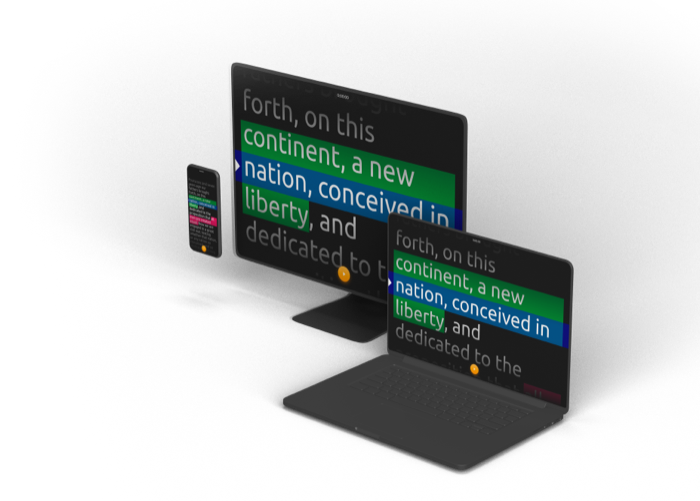
A short expert video does not have to begin with installing an app. Open TAKT, paste your text, move it close to the lens and choose a comfortable speed. Scrolling preserves sentence context; one-word mode gives you a narrower reading area. You can choose the format that suits your delivery.
For a slide explanation or product demonstration, add screen sharing in the same studio. A circular camera overlay keeps the speaker present, and recording pause lets you stop between parts of the explanation. The result is a downloadable presentation for your existing publishing channel.
PromptSmart emphasizes VoiceTrack, which follows spoken words. TAKT currently uses manual pacing. For a prepared script with planned pauses, our recommendation is to try TAKT’s focused workflow first, then decide whether automatic voice tracking is a requirement for your recordings.
A decision table
| Requirement | Takt | PromptSmart |
|---|---|---|
| Follow spoken words | Not yet available | VoiceTrack advertised |
| Author-controlled pace | Speed and manual controls | Modes depend on the app |
| Workflow considered here | Browser camera-and-screen recording | Reading with speech-adaptive prompting |
| Multiple-device session | Not implemented in Takt | Remote-control tools are available |
| Script language | Paste your own text | Check VoiceTrack language separately |
| Essential trial | Pauses, audio, download | Your speech and return to the script |
Do not assume PromptSmart’s web tools and recording apps are the same environment. Its portal and remote-control features serve different roles. Check the app edition and device combination before purchasing. How PromptSmart works
Voice scrolling is a different problem from transcription
An author does not merely need a transcript. The prompter has to locate the spoken passage within a prepared script. You might repeat a sentence, omit an introduction, or return to an earlier thought. A useful trial includes these actions instead of only reading a perfect paragraph from beginning to end.
Prepare a short opening, an example, and a conclusion. Read the opening, stop, add an unscripted explanation, and return to the example. Then deliberately repeat one sentence. Watch whether the passage you need stays in a comfortable reading area. This does not establish a universal accuracy score, but it tests the behavior your recordings actually need.
Do not expect this adaptation from the current Takt release. When you depart from the script, pause the prompter manually and return to the appropriate place before continuing. That may be sufficient for a short prepared video. For a long, freely delivered lesson, repeated manual intervention can become a distraction. Include that effort in the comparison.
Interface language is not speech language
Russian buttons do not prove Russian recognition, and being able to paste Hindi text does not establish Hindi voice-following. The checked PromptSmart page lists VoiceTrack languages including English and Russian. For other languages and code-switching, confirm support with the vendor and test your own material instead of relying on a demonstration recording.
Include the vocabulary you actually say: names, technical terms, abbreviations, and numbers. Run the trial with your usual microphone. A successful reading of your normal script is more informative than a polished demo featuring someone else’s pronunciation. Avoid choosing an annual plan only because the language appears on a supported-language list.
Choose around your next recording
TAKT uses a chosen speed and manual pauses; automatic speech-following is not available yet. If improvisation with automatic return to the script is mandatory, evaluate VoiceTrack. For a written lesson or demo, TAKT’s manual pace offers a straightforward way to rehearse and record the material. VoiceTrack
Start with one useful take
Write the answer to one question your audience asks. Keep the first version to an opening, a worked example and a next action. Put each thought in its own block in TAKT, then read it aloud with the camera preview visible. Shorten any sentence that takes more effort to say than to understand.
Now share the material you want the viewer to see. For slides, use a separate window and check that the circular camera does not cover an important number. Set the text near the lens and choose a pace that leaves room to breathe. Record, pause if you need to prepare the next step, and continue. Download the completed take and open it in your usual publishing workflow.
The useful comparison is whether that complete sequence meets your needs. TAKT gives you a free way to try it now, with no account or payment card required for the studio.
Frequently asked questions
Can I try TAKT for free?
Yes. The public web beta lets you read a script, record and download without registering or entering a payment card.
Can I record both my face and slides?
Yes. Share a window or tab, select Me + screen and choose a circular or another available camera layout.
Why choose TAKT for a prepared video?
Your script, reading controls and camera-and-screen composition are in the same browser studio. If your main task is delivering a clear lesson or demo to a publishing destination you already use, start there.
Your next take starts here
Open the free studio, paste your script and record your camera with your slides. No installation, account or payment card needed.
Try for free